Ajax发送get/post请求主要分为以下4步:
1.创建对象
1
| var xhr = new XMLHttpRequest();
|
2.设置请求行
//(get请求数据写在url后面)open('method','url','async');
/*method:请求的类型:GET或POST
  * url:文件在服务器上的位置
  * async:true(异步)或false(同步),默认true
  * */
xhr.open('get','getData.php',true);
3.设置请求头
//(get请求可以省略,post不发数据也可以省略)
xhr.setRequestHeader("Content-type","application/x-www-form-urlencoded");
4.请求主体发送
1
2
| //get请求为空,或者写null,post请求数据写在这里,如果没有数据,直接为空或者写null
xhr.send(null)
|
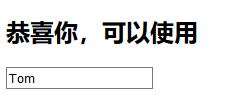
为了方便理解,下面我贴一个验证用户是否存在的小案例:
前端部分代码
1
2
3
4
5
6
7
8
9
10
11
12
13
14
15
16
17
18
19
20
21
22
23
24
25
26
27
28
| <!DOCTYPE html>
<html lang="en">
<head>
<meta charset="UTF-8">
<title>Title</title>
</head>
<body>
<h2>用户注册</h2>
<input type="text" placeholder="请输入用户名">
</body>
</html>
<script>
document.querySelector('input').onblur = function(){
var xhr = new XMLHttpRequest();
xhr.open('get','checkName.php?name='+this.value);
xhr.onload = function () {
document.querySelector('h2').innerHTML = xhr.responseText;
}
xhr.send(null);
}
</script>
|
后端部分代码
1
2
3
4
5
6
7
8
9
10
11
12
13
| <?php
$name = $_GET['name'];
$nameArr = array('jack','rose','nike');
$result = in_array($name,$nameArr);
if($result == true){
echo '很遗憾,已被使用';
}else{
echo '恭喜你,可以使用';
}
?>
|
查询前

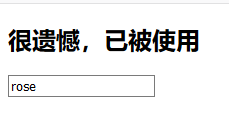
查询rose(数据库中存在)
查询Tom(数据库中不存在)