## 前言
轮播图是学习前端必须会的,面试的时候经常会面试到。轮播图的难点在于最后一张到第一张怎么实现无缝滚动,这是一种思维方式的转变。
原理
我们以3张的轮播图为例讲解。
如下图,制作三张轮播图时需要放4张图片,第四张和第一张一样。
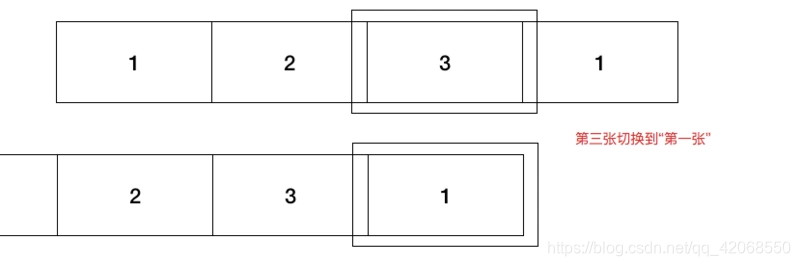
在如何从第四张1转到2呢?
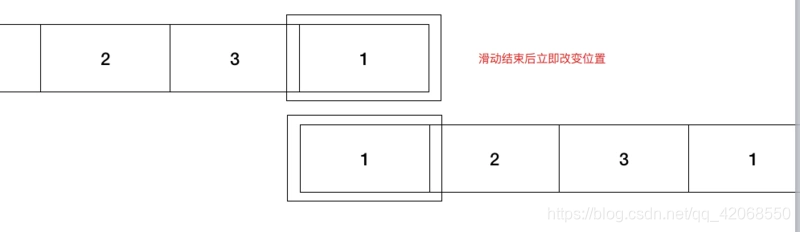
在我们从3移到1后,我们需要把第4张变成第一张。惯性思维会认为需要从第四张1移动到第一张1。其实对计算机而言,并没有这个过程,加上移动只是为了是我们看的舒服,我们直接设置外部ul的偏移量变成0,就变成第一张了,因为1,4两张图片一样所以看不出来变化。
这一部分代码:
1
2
3
4
5
6
7
8
9
10
11
12
13
14
15
| function start() {
timer = setInterval(() => {
num++
if (num >= 7) {
num = 1;
ul.css({
right: 0
});
}
ul.animate({
"right": width * num
})
}
|
Demo
为了方便,这里直接将css,js代码写在了html中,注意图片路径和jq路径需要改成自己的。
1
2
3
4
5
6
7
8
9
10
11
12
13
14
15
16
17
18
19
20
21
22
23
24
25
26
27
28
29
30
31
32
33
34
35
36
37
38
39
40
41
42
43
44
45
46
47
48
49
50
51
52
53
54
55
56
57
58
59
60
61
62
63
64
65
66
67
68
69
70
71
72
73
74
75
76
77
78
79
80
81
82
83
84
85
86
87
88
89
90
91
92
93
94
95
96
97
98
99
100
101
102
103
104
105
106
107
108
109
110
111
112
113
114
115
116
117
118
119
120
121
122
123
124
125
126
127
128
129
130
131
132
133
134
135
136
137
138
139
140
141
142
143
144
145
146
147
148
149
150
151
152
153
154
155
156
157
158
159
160
161
162
163
164
165
166
167
168
169
170
171
172
173
174
175
176
177
178
179
180
181
182
183
184
185
186
187
188
189
190
191
192
193
194
195
196
197
198
199
200
201
202
203
204
205
206
207
208
209
210
| <!DOCTYPE html>
<html lang="en">
<head>
<meta charset="UTF-8">
<meta name="viewport" content="width=device-width, initial-scale=1.0">
<meta http-equiv="X-UA-Compatible" content="ie=edge">
<script src="../../js/jquery-1.11.3.js"></script>
<style>
* {
margin: 0;
padding: 0;
border: 0;
}
.wrapper {
position: relative;
width: 500px;
margin: 30px auto;
}
.top {
width: 500px;
overflow: hidden;
}
li {
list-style-type: none;
float: left;
white-space: nowrap;
}
.imgs {
width: 4000px;
position: relative;
}
.center .btn {
position: absolute;
top: 140px;
color: white;
background-color: black;
opacity: 0.7;
width: 40px;
height: 60px;
line-height: 60px;
text-align: center;
}
.center .btn.left {
left: 0;
}
.center .btn.right {
right: 0;
}
.buttom .move {
position: absolute;
bottom: 10px;
transform: translateX(-50%);
left: 50%;
}
.buttom .move li {
width: 10px;
height: 10px;
border-radius: 50%;
background-color: skyblue;
text-align: center;
margin-left: 3px;
}
.bg {
background-color: red !important;
}
</style>
<title>Document</title>
</head>
<body>
<div class="wrapper">
<div class="top">
<ul class="imgs">
<li><img src="../image/1.jpg" alt="" width="500px" height="333"></li>
<li><img src="../image/2.jpg" alt="" width="500px" height="333"></li>
<li><img src="../image/3.jpg" alt="" width="500px" height="333"></li>
<li><img src="../image/4.jpg" alt="" width="500px" height="333"></li>
<li><img src="../image/5.jpg" alt="" width="500px" height="333"></li>
<li><img src="../image/6.jpg" alt="" width="500px" height="333"></li>
<li><img src="../image/1.jpg" alt="" width="500px" height="333"></li>
</ul>
</div>
<div class="center">
<div class="btn left">
<</div> <div class="btn right">>
</div>
</div>
<div class="buttom">
<ul class="move">
<li class="bg"></li>
<li></li>
<li></li>
<li></li>
<li></li>
<li></li>
</ul>
</div>
</div>
<script>
$(document).ready(function () {
ul = $('.wrapper .top .imgs')
var width = 500
var num = 1
start()
$('.buttom .move li').hover(function () {
ul.stop(true, true)
clearInterval(timer)
$(this).addClass('bg').siblings().removeClass('bg')
num = $(this).index()
ul.animate({
"right": width * num
})
}, function () {
start()
$(this).removeClass('bg')
})
$('.center .right').on('click', function () {
ul.stop(true, true)
clearInterval(timer)
num++;
if (num >= 7) {
num = 1;
ul.css({
right: 0
});
}
ul.animate({
"right": width * num
})
color()
start()
})
$('.center .left').on('click', function () {
ul.stop(true, true)
clearInterval(timer)
num--;
if (num <= -1) {
num = 5;
ul.css({
right: 3000
});
}
ul.animate({
"right": width * num
})
color()
start()
})
function color() {
if (num === 6) {
$('.buttom .move li').eq(0).addClass('bg').siblings().removeClass('bg')
} else {
$('.buttom .move li').eq(num).addClass('bg').siblings().removeClass('bg')
}
}
function start() {
timer = setInterval(() => {
num++
if (num >= 7) {
num = 1;
ul.css({
right: 0
});
}
ul.animate({
"right": width * num
})
if (num === 6) {
$('.buttom .move li').eq(0).addClass('bg').siblings().removeClass('bg')
} else {
$('.buttom .move li').eq(num).addClass('bg').siblings().removeClass('bg')
}
}, 1000);
}
})
</script>
</body>
</html>
|
效果图